From NotionNext to Astro: Rebuilding a Personal Website Around Markdown
Why I moved this personal website from a Notion-backed Next.js system to a smaller Astro site with local Markdown content.

A website can work and still be more system than it needs to be.
My old personal website was built with NotionNext. It used Next.js for routing and rendering, Notion as the content database, and React Notion X to turn Notion blocks into pages.
That setup had a clear advantage: writing in Notion was convenient. The website could read from a familiar editor, and the platform came with themes, plugins, integrations, and many ways to extend the site.
The problem was the distance between an article and the page a reader saw. A post depended on Notion fields, API access, block conversion, image handling, slug rules, theme configuration, and a large rendering system. When something went wrong, the cause could be several layers away from the page itself.
I wanted a smaller boundary between writing and publishing. That led to the move from NotionNext to Astro.
The change was bigger than a framework swap
The old repository was a general-purpose publishing platform. At the migration baseline, it contained 1,273 tracked files, including a large theme system, many optional components, Notion data access, configuration layers, and integrations.
The new repository has a much narrower job. It is a personal publication with local Markdown content, explicit routes, a shared visual system, and static output. At the migration baseline, the new tree contained 84 tracked files.
The important change was not simply replacing Next.js with Astro. It was moving the source of truth from a remote, runtime-shaped system into files I could own, inspect, and build together with the website.
Markdown becomes the source of truth
Each post now lives in src/content/posts. The file contains the article body and a small block of frontmatter that describes how the site should handle it:
---
title: "A useful title"
slug: "a-stable-url-slug"
description: "One sentence for cards and search engines."
date: 2026-07-13
category: "Sharing"
tags: ["Architecture note", "Web publishing", "Web development"]
draft: true
---
This is less convenient than opening a CMS dashboard, but it makes the publishing contract visible. The title, date, category, tags, and slug are written next to the article instead of being hidden inside a remote database.
The schema in src/content.config.ts checks those fields during the build. Draft posts are filtered out of the public pages. Published posts are sorted by date, and their public links are generated from the stable slug.
Images follow the same rule. Article media lives in public/images/posts/<slug>/, so a cover no longer depends on a signed Notion image URL that might need to be fetched or transformed later.
What Astro does here
Astro builds the website before a reader visits it. It reads the Markdown files, checks their frontmatter, puts each article into the right layout, and generates the finished pages. The browser then receives HTML and CSS without asking Notion how to assemble an article.
The current build path is small:
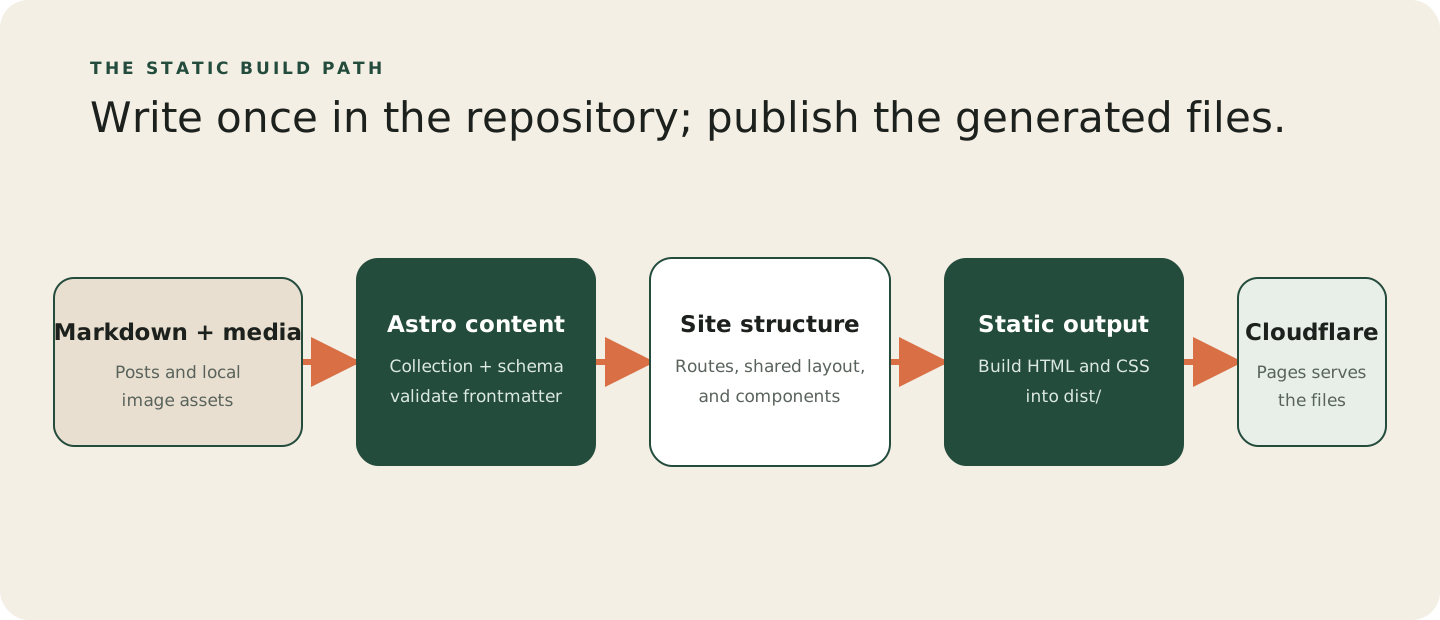
The code has a clear place for each responsibility:
src/content/postsowns the writing.src/content.config.tsdefines and validates the content shape.src/pagesdefines the URL surface, including the home page, writing list, article pages, categories, tags, search, RSS, and sitemap.src/layouts/BaseLayout.astroprovides the shared shell, metadata, navigation, and footer.src/componentscontains the repeated post card and cover units.src/styles/global.csscontains the visual system.
This is also where Astro feels different from a general application framework. Most of the site is rendered ahead of time. The search page has a small browser-side script because filtering already-rendered cards is useful. The rest of the site does not need a client-side application running just to display an article.
The reader’s path is intentionally short
From a visitor’s perspective, the site does not need a complicated flow.
Most journeys look like this:
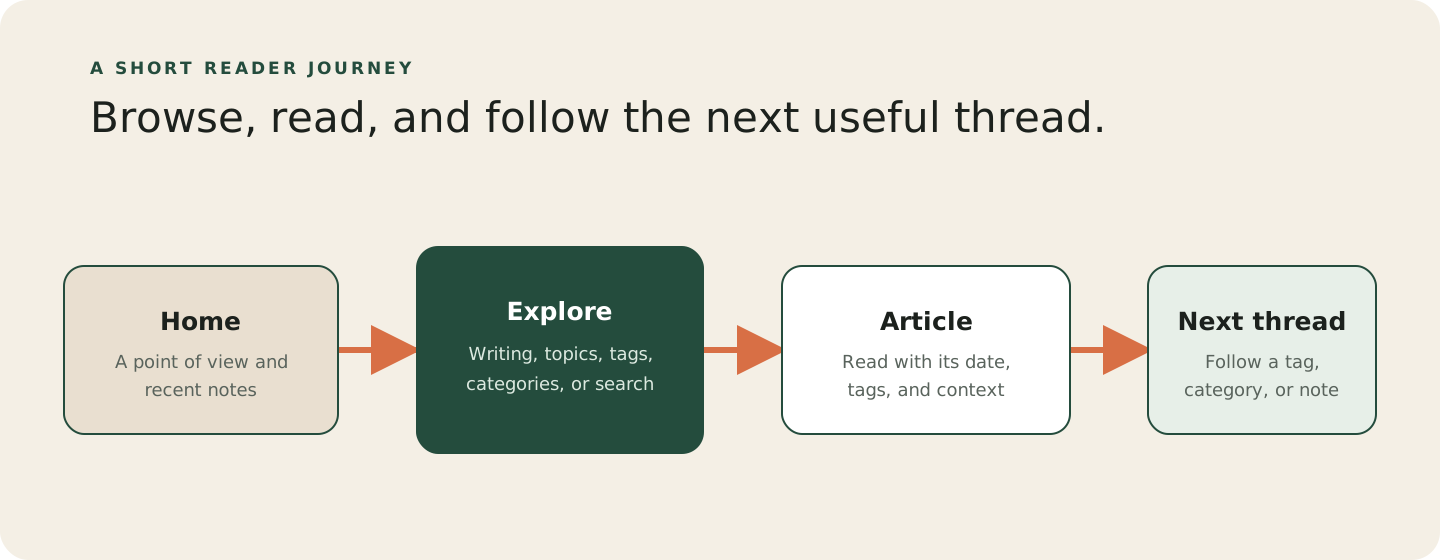
The home page gives the site a point of view, shows recent notes, and surfaces recurring topics. The writing page is the main index. An article page keeps the attention on the writing while still exposing its date, category, tags, cover, and table of contents when the article is long enough.
There is no account flow, checkout flow, or application dashboard hiding behind the pages. The site is meant to help someone browse, read, and find the next useful thread.
What got better
The new setup is easier to reason about in a few practical ways.
First, a visitor’s request no longer depends on a Notion API call. The build does the data work before deployment, so the production site serves files rather than assembling pages from a remote database.
Second, content and code now live together in Git. The article, its metadata, its images, and its history can be backed up and reviewed as one unit.
Third, the site has a smaller surface area. There are fewer configuration layers, fewer optional integrations, and fewer places for a simple article to become entangled with unrelated platform behavior.
Finally, the visual system became easier to make coherent. A shared layout, post card, post cover, and global stylesheet are enough for the current experience. The site can stay opinionated without carrying a generic theme system for features it does not use.
What I gave up
The new architecture is not a free upgrade.
Notion is no longer the live authoring and publishing interface. Writing now happens in Markdown and Git, which is a better fit for owning the site but a less friendly workflow for someone who wants a dashboard.
The old theme and plugin ecosystem is gone as well. There is no automatic return of every Notion block type, comment system, or third-party integration. If one of those features becomes important, it will need to be added deliberately rather than appearing as part of a large platform.
The site also does not revalidate content at runtime. An article change becomes public after a new build and deployment. For a personal publication, that trade-off is acceptable: the extra control is more valuable than instant remote updates.
Why Astro is a good fit for this site
Astro is not automatically the right choice for every personal website.
WordPress or another CMS makes more sense when several people publish frequently and need an administration dashboard. Next.js or another application framework becomes more attractive when the website is turning into an interactive product, dashboard, or service. A very small static generator may be enough for a portfolio that barely changes.
Astro fits this project because the centre of gravity is content, not application state. It gives the site component-based layouts and a modern build system, while still letting most pages remain simple HTML and CSS. When a page eventually needs an interactive feature, that feature can be added where it belongs instead of making the whole site behave like an application.
What I value most is that the architecture is easy to explain. A post is a Markdown file. Astro checks it and creates a page. Cloudflare serves the result. That is enough for the website I actually have.
Takeaway
The migration from NotionNext to Astro was about ownership and boundaries as much as a technical rewrite.
NotionNext was useful when I wanted a ready-made publishing platform around a Notion database. Astro is a better fit now that I want the content, routes, visual rules, and deployment model to be visible in one small repository.
The lesson is not that every personal website should move to Astro. It is that the framework should match the thing you are maintaining. For this site, local Markdown, static output, stable URLs, and a small amount of browser JavaScript are enough.